Paccarat
Lead Software Developer
Paccarat is a roguelike multi-deckbuilder where players recruit a rag-tag team of rats and craft a curated deck for each, discoverating devastating multi-deck combos.
The demo for Paccarat is available on Steam.
My Role
I served as the Lead Software Developer contributing to nearly every aspect of the game's technical development. My responsibilities included designing and implementing core gameplay systems, guiding and collaborating with other developers, building and iterating on UI using Unity's UI Toolkit, planning development sprints around major milestones, managing builds, and preparing releases for Steam. Below are several of the major systems and features I developed, along with details on how they were implemented and the design considerations that informed their architecture.
Card and Ability Effects
Early in development, we knew it would be critical to iterate quickly on cards and abilities. Designers needed the ability to experiment with new ideas without requiring frequent code changes. While the team had created some early prototypes, they still required too much engineering effort whenever a card needed a new variation or unique behavior.
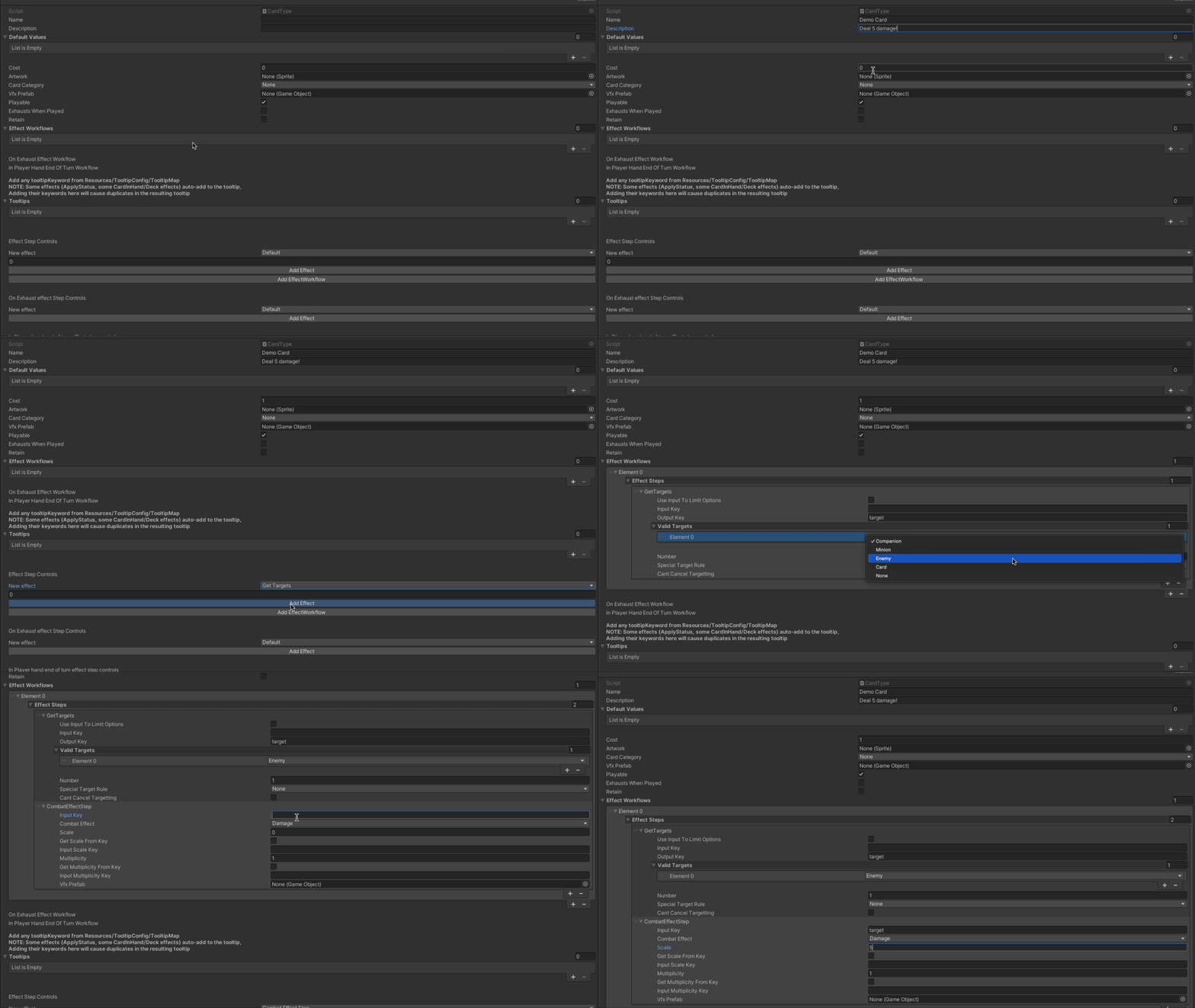
To solve this, I looked at the cards that had been designed so far and broke them down into their smallest functional building blocks. For example, a basic attack card can be described as a sequence of simple steps.
- Ask the player to select a target
- Deal damage to that target
Using this perspective, all cards can be broken down into reusable building blocks such as.
- Select a target
- Deal damage
- Draw card(s)
- Apply a status
- etc...
With these low level building blocks identified, I designed an effect system inspired by AWS Step Functions, where each card or ability effect is represented as a workflow composed of modular steps. Each step performs a single operation and passes information forward through an Effect Document (a shared key-value data store), which acts as a shared data container for the workflow.
The sequence of steps that define a card's behavior is configured directly in the card's ScriptableObject inspector, allowing designers to assemble complex effects without writing code. Each step declares the values it reads from and writes to within the Effect Document. Internally, the document stores data using maps for primitive types such as strings and integers, as well as a custom generic list dictionary that allows generic objects to be passed between the steps when needed. This approach sacrifices some compile-time type safety, but it provides the high flexibility needed for a highly data-driven system.
This system made it possible to create highly varied cards while keeping the underlying implementation modular, extensible, and designer-friendly.
Focus and Navigation Control
To support both keyboard and controller navigation, I implemented a custom FocusManager that handles focus and input routing across both worldspace GameObjects and UI Toolkit VisualElements. Each focusable object registers itself with the FocusManager. Worlspace objects and UI elements each have thier own focusable component responsible for handling callbacks when an element gains or loses focus. The FocusManager maintains the global focus state while each individual focusable component is responsible for their own behavior when gaining or losing focus. Below are the core capabilities of the FocusManager.
Focus registration and state management
- Registering and unregistering focusable elements
- Maintaining the list of active focusables
- Tracking which element currently has focus
Directional Navigation
When directional input is received, the FocusManager determines the most appropriate element to move focus to by evaluating nearby candidates. This is done by calculating the dot product and scoring based on alignment and distance, ensuring that navigation feels natural relative to the input direction.
Since UI elements exist in UI space, their positions are translated into world space coordinates so that both UI and worldspace focus targets can participate in the same navigation logic. The navigation scoring system was tuned to prioritize elements aligned with the input direction while still allowing reasonable fallback candidates when no perfectly aligned candidate exists.
Constrained Navigation
Some UI elements require focus to move between a limited set of elements. The system supports defining explicit navigation targets, allowing focus movement to be restricted when necessary.
Contextual input handling
The FocusManager also listens for alternate inputs and checks whether the currently focused element defines behavior for that input. This enables actions such as opening menus or triggering alternate interactions using keys other than the primary confirm button.
Focus stacking and UI transitions
When new UI layers or menus are opened, existing focusable elements can be temporarily stashed using a
stashedBy key. This disables them until the menu is closed and focus is restored to the underlying elements.Deferred focus activation
When new focus objects are created in the background while another UI is open, newly registered focusables can be locked so they don't immediately become available for navigation. They are only activated once the current UI layer is dismissed.
This system allowed both worldspace gameplay elements and UI Toolkit UI to share a consistent navigation model while remaining flexible enough to support complex UI state.
UI Architecture with UI Toolkit
For Paccarat's UI we chose Unity UI Toolkit, which Unity has set up as the long-term replacement for uGUI. Because our team already had experience with web development, UXML + USS workflow made UI iteration fast and intuitive.
To keep the UI logic organized and avoid tightly coupling gameplay code to individual UI elements, I implemented a ViewController pattern inspired by MVC.
Each
UIDocument (or major VisualElement with a document) is wrapped by a dedicated ViewController script. The ViewController owns the root VisualElement and acts as the single point of contact for all interactions with that UI.This has several advantages.
- Centralized control of UI behavior
- Encapsulation of UI state
- Clear separation between gameplay logic and presentation
Views are responsible for managing their own internal state and determining when elements should be active, visible, or updated.
Sub-View Communication with Delegates
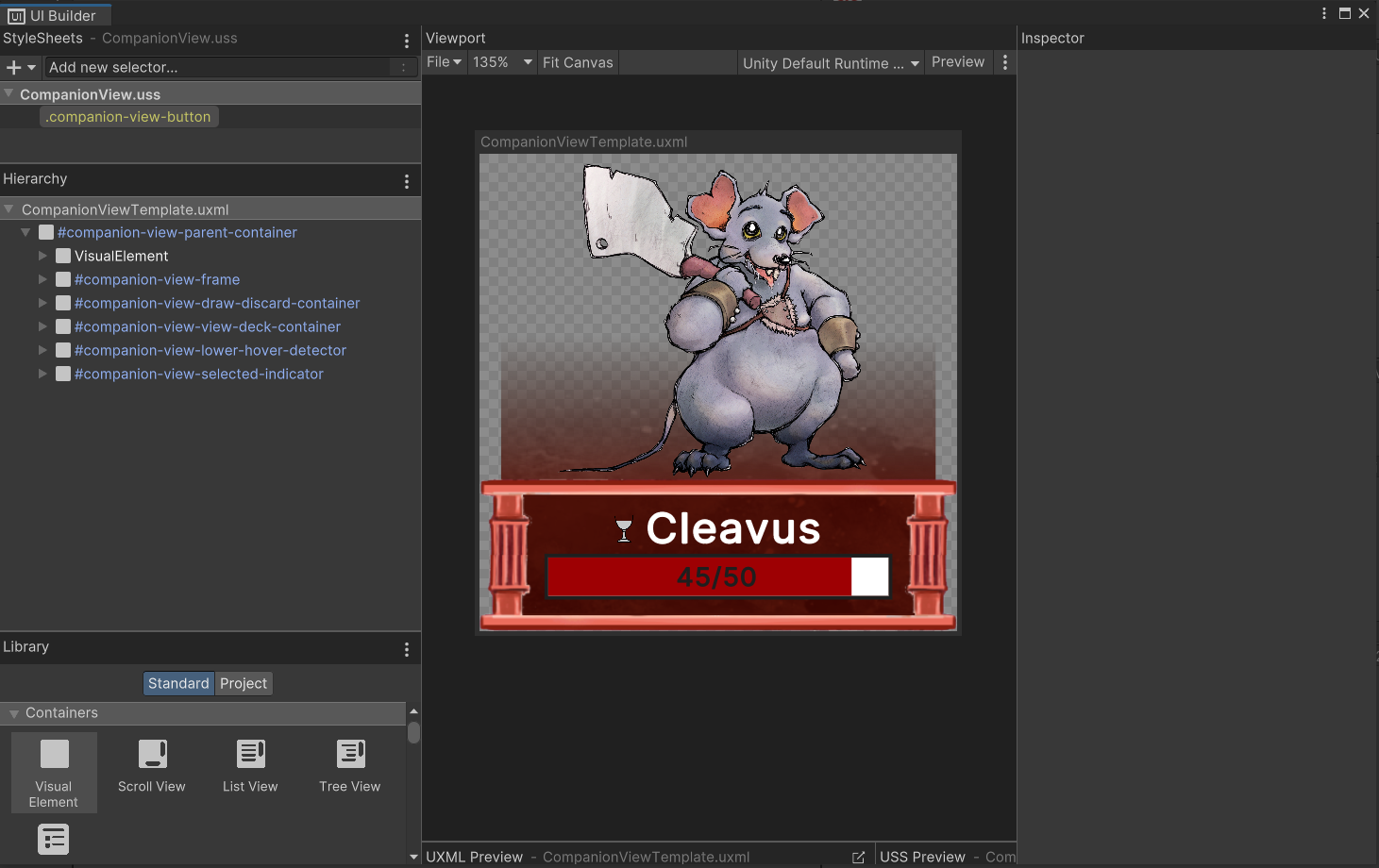
Reusable UI components such as cards and companion views often appear in multiple contexts. However, the behavior triggered by interacting with these elements can differ depending on where they are used. To support this, sub-views are provided with a ViewDelegate interface that is implemented by their parent views.
For example, the
CompanionView behaves differently depending on the context.- Combat: clicking a companion sends input to the targeting manager
- Shop: clicking may initiate a purchase of the companion
- Decorative UI: clicking the companion may do nothing
The parent view implements the delegate interface to define appropriate behavior, allowing the sub-view to remain reusable and context-agnostic.
Template-Based Sub-Views
Reusable UI elements are defined using UXML templates, which are instantiated at runtime when needed. This approach allows designers to adjust styles and layouts directly in UXML without modifying code, while developers can keep control over runtime behavior.
Rendering and VFX Challenges
One challenge we encountered when using UI Toolkit was render ordering and VFX integration.
By default,
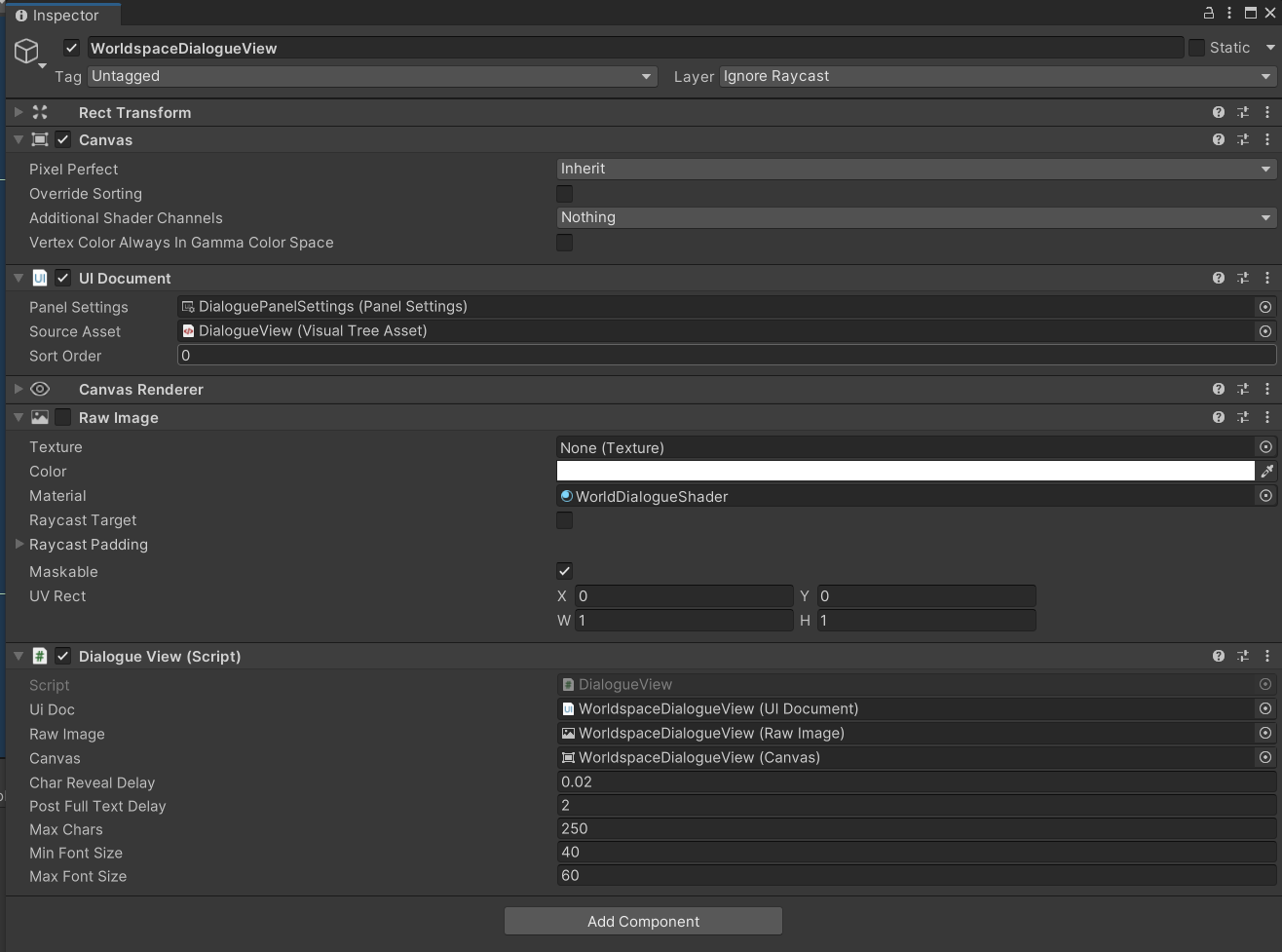
UIDocument content renders after the rest of the scene, meaning it always appears on top of world elements. This became a problem because some core parts of theg ame, including the combat scene, are implemented almost entirely in UI document. We also wanted certain visual effects to appear above specific UI elements, which is difficult with UI Toolkit's default rendering pipeline.To solve this, we render the UI Toolkit output to a Render Texture, then display that texture on a RawImage inside a uGUI Canvas. This allows us to use traditional sorting layers and render order control, while still building the interface using UI Toolkit. This hybrid approach preserved the flexibility of UI Toolkit while allowing the game's VFX system to integrate naturally with the UI layer.
While this hybrid appraoch adds an additional rendering step, it allowed us to retain the felixibility of UI Toolkit while still integrating with the game's existing VFX and sorting layers.
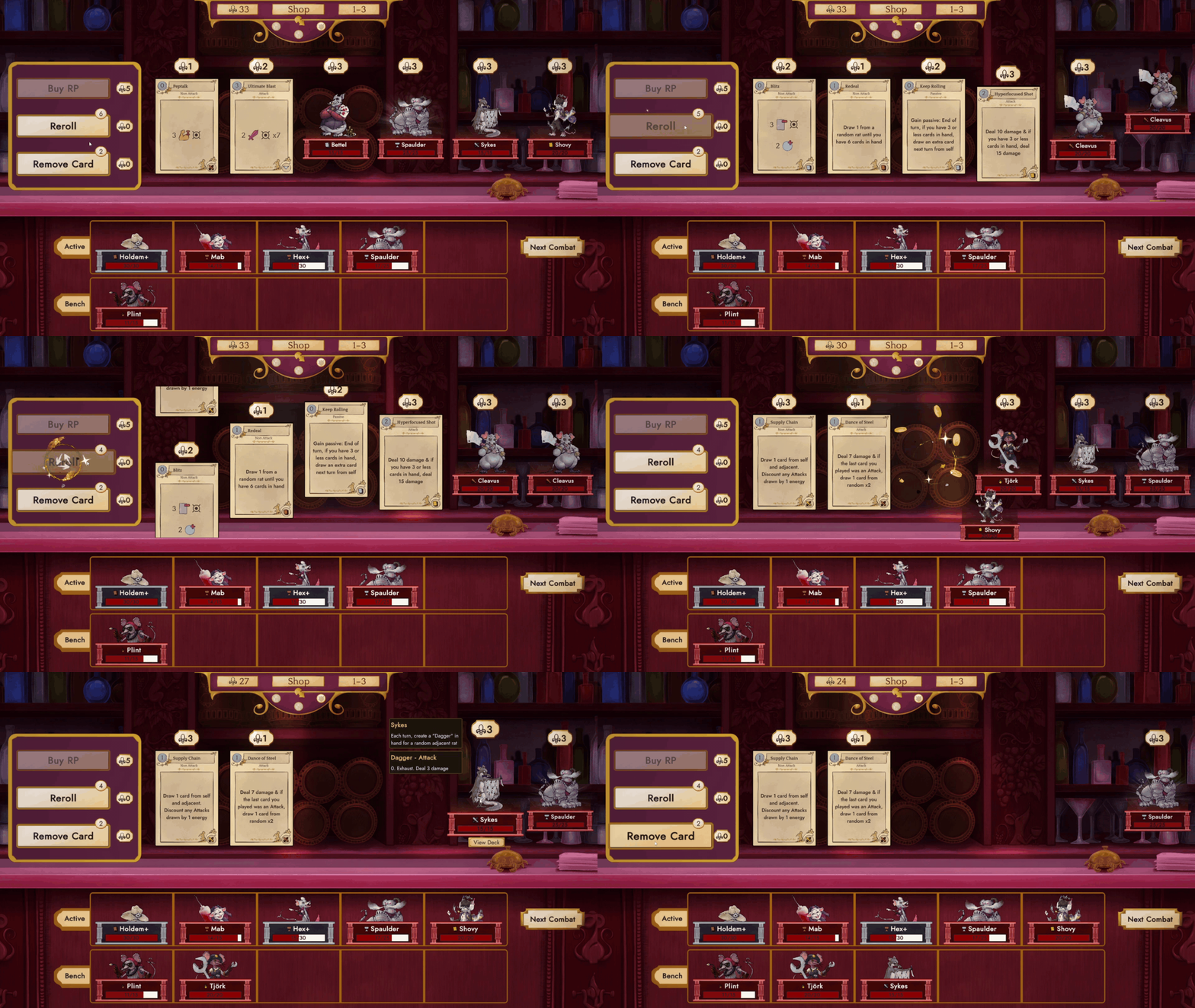
Before working with UI Toolkit, I personally had very little experience with web development (but the rest of our team did). Working with UI Toolkit has truly helped me learn the major components of page layouts and stylesheets, enough to be able to build this website from scratch.
Persistent Game State using ScriptableObjects
From early in development, I wanted to lean into Unity’s component-based architecture and maintain a clean separation between scenes. A common approach to sharing state between scenes is to create persistent manager objects using
DontDestroyOnLoad, but this often requires a dedicated initialization scene and can tightly couple scene loading order to game state setup.Instead, I implemented a ScriptableObject-driven persistence layer to maintain game state across scenes. Key pieces of runtime state, such as player data, the current map, and encounter progression, are stored in
VariableSO objects. Once loaded into memory, these ScriptableObjects persist across scene transitions, allowing scenes to read and update shared state without requiring persistant GameObjects.This approach enables clean scene transitions where a scene simply updates the relevant state and loads the next scene. Because the sate lives outside of any particular scene, this avoids complex initialization logic, multi-scene loading setups, or fragile cross-scene references.
Another benefit of this architecture is improved development workflow. Developers can load directly into any scene in the game withoout needing to first run an init scene. To support this workflow, I helped build a suite of custom inspector tools for the state ScriptableObjects. These tools allow developers to quickly inspect and modify runtime state directly from the editor. With a single button press, the system can analyze the current scene and automatically configure the required state objects so that the scene runs correctly in isolation.
This system keeps scene logic modular, simplifies debugging, and significantly speeds up iteration when testing individual gameplay scenarios.